5 Email Signature Mistakes That Make You Look Unprofessional
Your email signature says more about you than you think. Every message you send is a mini-introduction — and if your signature is cluttered, outdated, or poorly designed, it’s quietly undermining your credibility before anyone reads a word you wrote.
The average professional sends around 40 emails per day. That’s 40 chances to look polished and trustworthy — or 40 chances to leave the wrong impression. Here are five of the most common email signature mistakes and how to fix them fast.
1. Cramming in Too Much Information
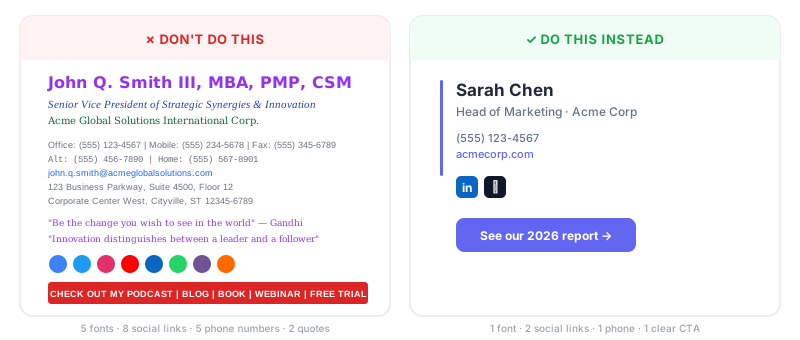
This is the number one offender. You’ve seen them: signatures with three phone numbers, a fax line, a physical address, a legal disclaimer, a mission statement, and a motivational quote — all stacked into a block the size of a small novel.
More isn’t better. A bloated signature overwhelms recipients and buries the information that actually matters. Stick to the essentials: your name, title, company, one phone number, and your website. If you want to add a social link or a call-to-action, pick one — not six.
A clean, focused signature tells people you respect their time. That’s professional.
2. Using Too Many Fonts and Colors
Playing with typography might seem like a way to stand out, but mixing multiple fonts, sizes, and colors in your signature has the opposite effect. It looks chaotic, it’s harder to read, and it signals that you don’t sweat the details.
The fix is simple: use one font (two at most — one for your name, one for everything else). Stick to your brand colors, and keep the palette to two or three tones. High contrast between text and background is essential — a 4.5:1 contrast ratio is the accessibility standard, and it also happens to look sharper.
Tools like Byline let you customize fonts and colors per field while keeping everything visually cohesive, so you don’t have to guess what works.
3. Forgetting About Mobile

Here’s a stat that should change how you think about signatures: over 42% of all emails are now opened on mobile devices. If your signature looks great in Outlook on your desktop but turns into a jumbled mess on someone’s phone, you’re losing credibility with nearly half your audience.
Mobile-friendly signatures need to be narrow (600 pixels max), lightweight (under 100KB), and designed so that phone numbers and links are easy to tap. Skip the wide banner images and multi-column layouts — they almost never survive the transition to a small screen.
Before you finalize any signature, send yourself a test email and open it on your phone. If anything looks off, fix it before it goes out to clients.
4. Letting Your Signature Go Stale
Outdated information is a silent credibility killer. Maybe you changed roles six months ago, or your company rebranded, or you’re still linking to a landing page that no longer exists. Recipients notice — and it makes you look careless.
Set a calendar reminder to review your signature every quarter. Check that your title is current, your links work, your logo matches the latest brand, and your phone number is right. For teams, this is where centralized signature management pays off. When one person updates the template, everyone stays current automatically.
With a tool like Byline, team admins can push updates across every signature in the organization — no chasing down individuals one by one.
5. Inconsistent Signatures Across Your Team
When every employee designs their own signature, the result is a patchwork of fonts, layouts, logos, and styles. One person uses Comic Sans, another includes a three-paragraph bio, and a third has no signature at all. To your customers, it looks like your company doesn’t have its act together.
According to recent surveys, over 25% of organizations cite standardized signatures as their top email branding priority — because consistency builds trust. When every email from your company looks cohesive, it reinforces your brand with zero extra marketing spend.
The solution isn’t a PDF style guide that nobody follows. It’s giving your team a single, well-designed template with locked fields for the elements that need to stay consistent, while still letting individuals personalize their name, title, and photo.
Fix Your Signature in Five Minutes
Your email signature is one of the highest-frequency touchpoints your brand has. Fixing these five mistakes doesn’t take a redesign — it takes a few intentional choices about what to include, how to style it, and how to keep it current.
If you want a professional signature without the guesswork, create a free account on Byline and choose from professionally designed templates that are built to look great everywhere — desktop, mobile, Gmail, Outlook, and beyond.
George Khairallah
Founder of Byline
George helps professionals and teams build branded email signatures that make every email count. He founded Byline to bring enterprise-grade signature management to individuals and small teams at a price that makes sense.